Controlling the projectors via computer
Christie gave me a useful bit of software which enables you to control the projectors (zoom, focus, lens shift etc) from the computer, and to read in information from the computer. The installation program is here. Christie’s documentation is here. I’ve reproduced some of it below.
To use this, you need to connect a null modem serial cable from one of the serial ports of the PC to the “serial port in” on the projector. (NB – do not confuse this with “serial port out”!). The PC’s serial ports are male rectangular outputs with 5 pins on the top row and 4 on the bottom. A null modem serial cable is female at both ends, and is also known as a “crossover” cable — i.e. the 2nd and 3rd pins are swapped over in the cable. So, it’s not the same as a male-female serial cable with a gender converter!
You can monitor both projectors at once using the two serial ports, COM1 and COM2. (On Gryffindor these are labelled: COM1 is the top one.) Make sure the projectors have power (they do not need to be projecting, but they need to be in at least stand-by mode, with the red and green indicator lamps lit.) Fire up the program, then select the appropriate COM port, then select the model “L6/LX65/Blue”. Apparently this is a projector which is compatible with the Matrix 2500. Then, you should see a control panel divided into 3 main components, setup, control and status. To close the window, simply select the “Close” button located at the top right of the window.
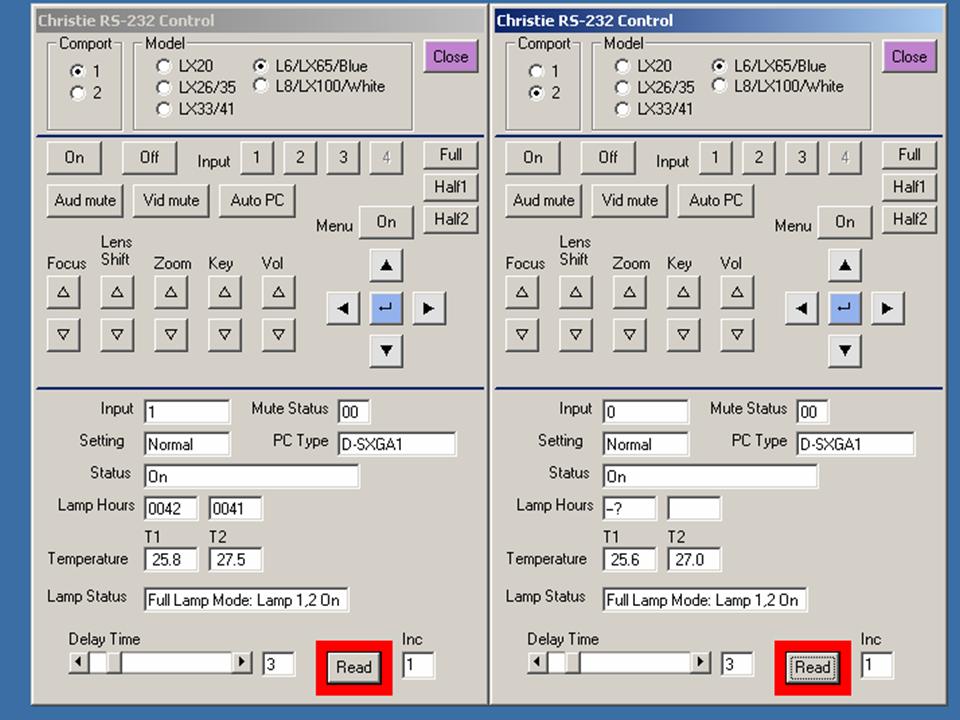
Control
The control section of the window allows the user to control basic setup parameters of the projector. Selecting any of the buttons will change the variable associated with the projector. The “Focus” button will change focus by sending the appropriate RS-232 command. If the projector is considerably out of focus, then selecting the focus button may not show enough focus change immediately. If this happens either continue to press the focus button until the unit comes in focus, or use the remote control/front panel buttons on the projector.
Status
The status area will show key real time information on key projector parameters. Different projectors will send back different information to the status area. To read in information from the projector, select the “Read” button. It will read back information from the projector N times where N is the number in the Inc. box. The default for N is 5. It can be changed by typing a new value into the box. As the information is read back from the projector, the value in the Inc. box will decrement. After finishing reading in values, the green box around the “Read” button will turn to red.
Set the delay time to the amount of time between each reading. The default is 3 seconds.
If there is some problem with the connection to the projector the Read button will not decrement and no values will be read into the status variables.